PTP Examples
PTP Dashboards
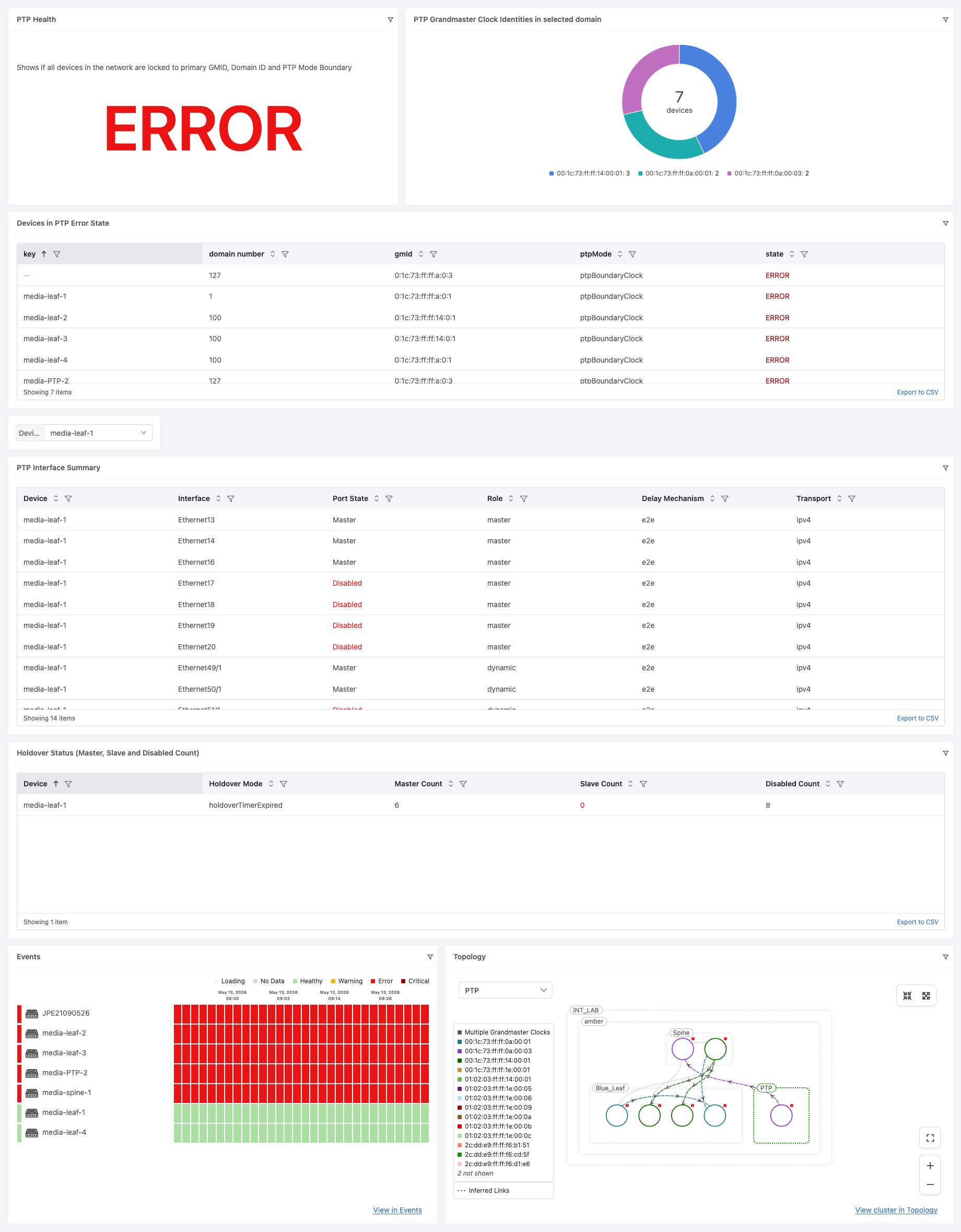
This dashboard provides overall PTP health per PTP domain. It validates that all switches within a tagged PTP domain are locked to the expected Grandmaster ID, configured with the correct Domain ID, and running in PTP Boundary Clock mode. Discrepancies are shown via color-coded health indicators (OK/WARNING/ERROR).
The dashboard addresses the following use cases:
Inconsistent PTP GMID detection – An error is raised if tagged switches are not all locked to one of the expected GMIDs. A warning is raised if switches are not running
ptp mode boundary. Additionally, if all of the switches within the same PTP Domain are not locked to same GMID then a “WARNING” is shown.Inconsistent PTP Domain ID detection – An error is raised if tagged switches are not configured with the correct domain ID.
PTP Interface Summary – Shows per-device PTP port status including role, port state, transport and delay mechanism.
Holdover Status – Shows per-device holdover mode and counts of Master, Slave and Disabled PTP ports.
PTP Events – Displays PTP-related events such as grandmaster changes, unexpected GMIDs and domain inconsistencies.
Pre-requisites
Devices must be tagged with the following tags in CloudVision (Provisioning > Tags within a workspace):
PTP_DOMAIN:<domain_name>– identifies the group of switches belonging to a single PTP domain (e.g.PTP_DOMAIN:PROD)PTP_DomainID:<id>– the expected PTP domain ID number (e.g.PTP_DomainID:127)PTP_GMID:<gmid>– one or more expected Grandmaster IDs in hex format (e.g.PTP_GMID:00:02:c5:ff:fe:34:5b:40)
Review and submit the workspace to publish the tag assignments
The dashboard uses input filters for
DomainID,GMID,Domain(tag query) andDeviceto scope the widgets
PTP Health
Shows if all devices in the network are locked to the primary GMID[s], correct Domain ID and PTP Mode Boundary. Returns a single value: OK, WARNING (multiple valid GMIDs detected) or ERROR (misconfigurations found).
% experimentalFeatures = true
let ptpStatus = `*:/Sysdb/ptp/status/parentDS`
let ptpConfig = `*:/Sysdb/ptp/config`
let dataSetDevices = merge(`analytics:/DatasetInfo/Devices`)


let error = 0
let ok = 0

let gl = newDict()
for t, val in _GMID{
    let strsplit = strSplit(t, ":")
    let idx = 0
    let key = ""
    for splitval in strsplit{
        if length(key) == 0{
           let key = str(parseInt(splitval,16))
        }else{
        let key = key+":"+str(parseInt(splitval,16))
        }
    }
    gl[key] = t
}
let devByGmId = newDict()
for dataSet, dDetails in ptpStatus {

    if (dictHasKey(_Domain, dataSet)){
     let gmId = merge(dDetails)["grandmasterIdentity"]
      let gc = gmId["value"]
      let gmIdStr = formatInt(gc["v0"],16) + ":" + formatInt(gc["v1"],16) + ":" + formatInt(gc["v2"],16) + ":" + formatInt(gc["v3"],16) + ":" + formatInt(gc["v4"],16) + ":" + formatInt(gc["v5"],16) + ":" + formatInt(gc["v6"],16) + ":" + formatInt(gc["v7"],16)
      let gmIdAsStr = str(gc["v0"]) + ":" + str(gc["v1"]) + ":" + str(gc["v2"]) + ":" + str(gc["v3"])+ ":" + str(gc["v4"]) + ":" + str(gc["v5"]) + ":" + str(gc["v6"]) + ":" + str(gc["v7"])
        if !dictHasKey(devByGmId, gmIdStr){
            devByGmId[gmIdStr] = newDict()
        }
    devByGmId[gmIdStr][dataSet] = true
      let dId = merge(ptpConfig[dataSet])["domainNumber"]

     let match = false

    if dictHasKey( gl, gmIdAsStr){
      let match = true
    }
    let ptpModeStr = merge(ptpConfig[dataSet])["ptpMode"]["Name"]
    if (!match || ptpModeStr!= "ptpBoundaryClock" || str(dId) != _DomainID) {
        let error = error + 1
    }else{
        let ok = ok + 1
    }

}}


if error == 0{
    let retString = "OK"
    if length(devByGmId) > 1 {
        let retString = "WARNING"
    }
}
if error > 0{
    let retString = "ERROR"
}

retString

GMID Input Variable
Populates the GMID multi-select input filter by reading PTP_GMID tag values from CloudVision.
let gmids = merge(`analytics:/tags/labels/devices/PTP_GMID/value`)
gmids
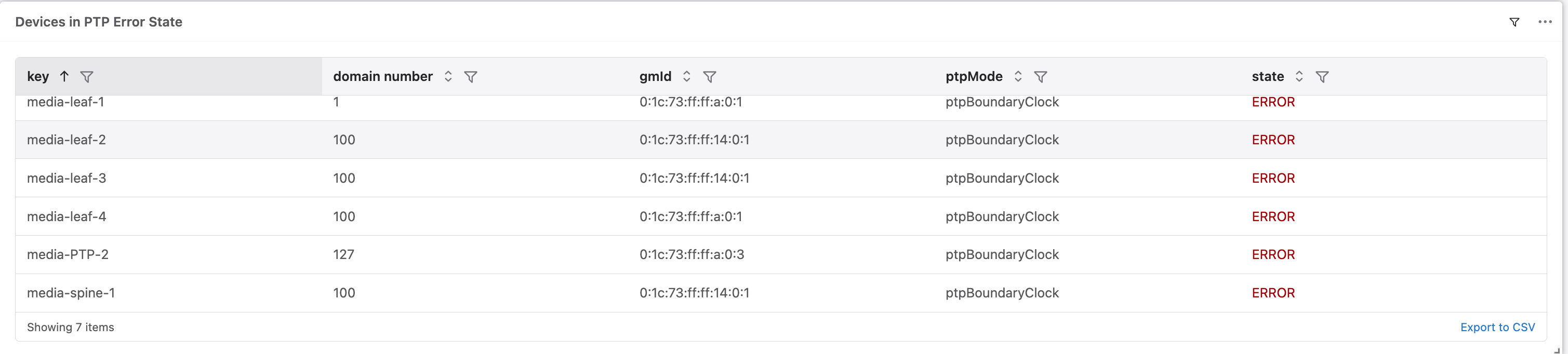
Devices in PTP Error State
Lists all devices whose PTP configuration does not match the expected GMID, Domain ID, or PTP mode. Devices with valid configuration but multiple active GMIDs in the domain are shown with a WARN state.
% experimentalFeatures = true
let ptpStatus = `*:/Sysdb/ptp/status/parentDS`
let ptpConfig = `*:/Sysdb/ptp/config`
let dataSetDevices = merge(`analytics:/DatasetInfo/Devices`)
let devMap = newDict()
for dataSet, dataValues in dataSetDevices{
    if (dictHasKey(_Domain, dataSet)){
        devMap[dataSet ] = newDict()
        devMap[dataSet ]["hostname"] = str(dataValues["hostname"])
        devMap[dataSet ]["mac"] = str(dataValues["mac"])
        }}


let result = newDict()
let ptpData = newDict()
let gmIdStatus = true
let ptpConfigStatus = true

let inputGMlist = newDict()
for t, val in _GMID{
    let strsplit = strSplit(t, ":")
    let idx = 0
    let key = ""
    for splitval in strsplit{
        if length(key) == 0{
           let key = str(parseInt(splitval,16))
        }else{
        let key = key+":"+str(parseInt(splitval,16))
        }
    }
    inputGMlist[key] = t
}

let readDevByGmId = newDict()

let readValidGm = newDict()

for dataSet, dDetails in ptpStatus {
    if (dictHasKey(_Domain, dataSet)){
    let gmId = merge(dDetails)["grandmasterIdentity"]
    let gc = gmId["value"]
    let gmIdStr = formatInt(gc["v0"],16) + ":" + formatInt(gc["v1"],16) + ":" + formatInt(gc["v2"],16) + ":" + formatInt(gc["v3"],16) + ":" + formatInt(gc["v4"],16) + ":" + formatInt(gc["v5"],16) + ":" + formatInt(gc["v6"],16) + ":" + formatInt(gc["v7"],16)
    let gmIdAsStr = str(gc["v0"]) + ":" + str(gc["v1"]) + ":" + str(gc["v2"]) + ":" + str(gc["v3"])+ ":" + str(gc["v4"]) + ":" + str(gc["v5"]) + ":" + str(gc["v6"]) + ":" + str(gc["v7"])
    let hostname = devMap[dataSet]["hostname"]
    if !dictHasKey(readDevByGmId, gmIdAsStr){
        readDevByGmId[gmIdAsStr] = newDict()
        }
    readDevByGmId[gmIdAsStr][hostname] = true
    let dId = merge(ptpConfig[dataSet])["domainNumber"]
    let ptpModeStr = merge(ptpConfig[dataSet])["ptpMode"]["Name"]
    let match = "OK"
    if ! dictHasKey( inputGMlist, gmIdAsStr) || ptpModeStr!= "ptpBoundaryClock" || str(dId) != _DomainID{
      let match = "ERROR"
    }
    ptpData[hostname] = newDict()
    ptpData[hostname]["gmId"] = gmIdStr
    ptpData[hostname]["ptpMode"] = ptpModeStr
    ptpData[hostname]["domain number"] = dId
    ptpData[hostname]["match"] = match

    if dictHasKey (inputGMlist, gmIdAsStr){
        readValidGm[gmIdAsStr] = true
    }
    }
}


for gmIdAsStr, devs in readDevByGmId{
    for dev, value in devs{
        if  ptpData[dev]["match"] != "OK"{
            result[dev] = newDict()
            result[dev]["domain number"] = ptpData[dev]["domain number"]
            result[dev]["gmId"] = ptpData[dev]["gmId"]
            result[dev]["ptpMode"] = ptpData[dev]["ptpMode"]
            result[dev]["state"] =  ptpData[dev]["match"]
        }
    }
}

if length(readValidGm) > 1{
for gmId, devs in readDevByGmId{
    for dev, value in devs{
        if  ptpData[dev]["match"] == "OK"{
            result[dev] = newDict()
            result[dev]["domain number"] = ptpData[dev]["domain number"]
            result[dev]["gmId"] = ptpData[dev]["gmId"]
            result[dev]["ptpMode"] = ptpData[dev]["ptpMode"]
            result[dev]["state"] =  "WARN"
        }
    }
}
}

result
PTP Interface Summary
Shows per-device PTP port details for a selected device, including interface name, role, port state, transport mode and delay mechanism. Ports that are admin-disabled are excluded. Port states other than Master or Slave are highlighted in red.
let ptpPort = `<_Device>:/Sysdb/ptp/status/portDS/*`

let result = newDict()
for intfPath, intfValue in ptpPort{
    let intfDetails = merge(intfValue)
    if ! intfDetails["adminDisabled"]{
        let key = intfPath["intf"]
        result[key] = newDict()
        result[key]["Device"] = _Device
        result[key]["Interface"] = intfPath["intf"]
        result[key]["Role"] = intfDetails["role"]["Name"]
        result[key]["Port State"] = strReplace(intfDetails["portState"]["Name"], "ps", "")
        result[key]["Transport"] = intfDetails["transportMode"]["Name"]
        result[key]["Delay Mechanism"] = intfDetails["delayMechanism"]["Name"]
    }

}


result

Holdover Status
Displays the holdover mode and counts of Master, Slave and Disabled PTP ports per device. A Slave Count of 0 is highlighted in red as it may indicate a loss of PTP synchronization.
let ptpPort = `<_Device>:/Sysdb/ptp/status/portDS/*`
let ptpHoldOverState = `<_Device>:/Sysdb/ptp/status`
let deviceCounts = newDict()
let dataSet = _Device

deviceCounts[dataSet] = newDict()
deviceCounts[dataSet]["Master Count"] = 0
deviceCounts[dataSet]["Slave Count"] = 0
deviceCounts[dataSet]["Disabled Count"] = 0
deviceCounts[dataSet]["Holdover Mode"] = merge(ptpHoldOverState)["holdoverState"]["Name"]

for intfPath, intfValue in ptpPort {
    let intfDetails = merge(intfValue)

    if !intfDetails["adminDisabled"] {
        let portStateName = intfDetails["portState"]["Name"]

        if portStateName == "psMaster" {
            deviceCounts[dataSet]["Master Count"] = deviceCounts[dataSet]["Master Count"] + 1
        }
        if portStateName == "psSlave" {
            deviceCounts[dataSet]["Slave Count"] = deviceCounts[dataSet]["Slave Count"] + 1
        }
        if portStateName == "psDisabled" {

            deviceCounts[dataSet]["Disabled Count"] = deviceCounts[dataSet]["Disabled Count"]+ 1
        }
    }
}


deviceCounts

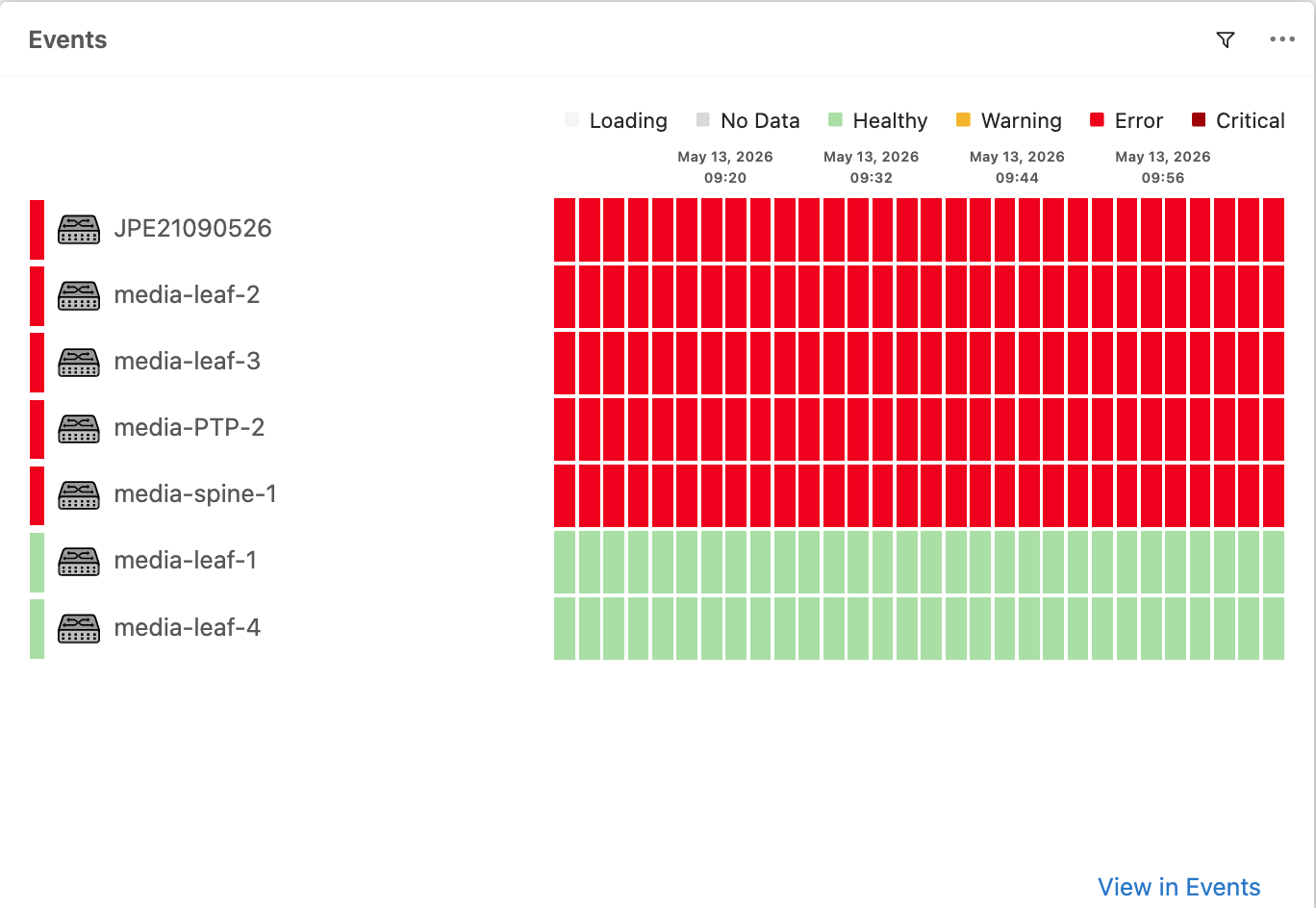
PTP Events
The events widget is configured to show the following PTP event types:
INCONSISTENT_PTP_DOMAIN_IDINCONSISTENT_PTP_GMIDPTP_DOMAIN_ID_GROUPPTP_GRANDMASTER_GROUPSYS_PTP_GRANDMASTER_CHANGEUNEXPECTED_PTP_GMID
Events are filtered by the Domain tag and show WARNING, ERROR and CRITICAL severities for non-maintenance devices.
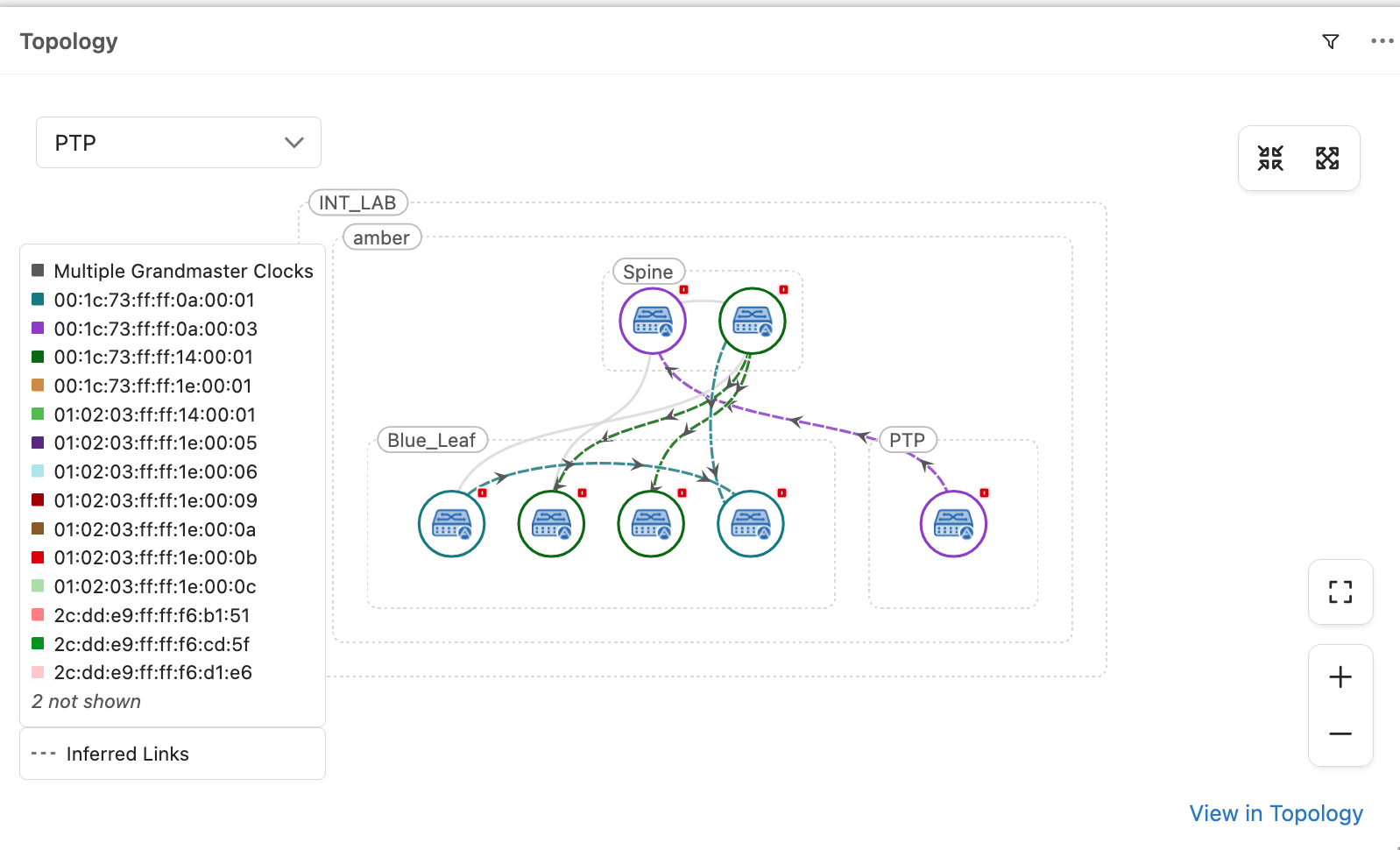
PTP Topology
The topology widget shows the network topology with the PTP overlay enabled, filtered by the Domain tag. This provides a visual representation of PTP roles and states across the network.